Practical Event Sourcing with SQL (Postgres)
Event sourcing is an excellent software design pattern. Instead of persisting current state of an asset and mutating it
in place. An asset is represented by the events through its life cycle. When the current state of an asset is needed
its re-computed from the events.
Despite being a great way to solve many problems its somewhat scarcely applied. There are undoubtedly many reason for
this, but personally I suspect part of the problem is lack of good examples of how to use it. I've seen plenty of
software engineers understand the theory and utility of Event Sourcing but struggle with implementation there of. It
doesn't need to be this way. Event Sourcing can be implemented in common relational databases such as postgres and
mysql. The database schemas of Event Sourcing implementations don't vary all that much and as a result by mastering
couple of building blocks, Event Sourcing becomes approachable.
Quick primer to event sourcing theory
A quick example of event sourcing. Consider a data schema to represent a book tracking system at a library:
| Book |
Status |
Date |
Member |
| Humiliated and Insulted |
Checked Out |
2021-02-12 |
Alice |
| Crime and Punishment |
Checked Out |
2021-01-11 |
Bob |
| The Idiot |
Checked In |
2002-12-02 |
Mallory |
We can mutate assets in place. And so if Eve was to check out The Idiot the stored data in the database would now look
like:
| Book |
Status |
Date |
Member |
| Humiliated and Insulted |
Checked Out |
2021-02-12 |
Alice |
| Crime and Punishment |
Checked Out |
2021-01-11 |
Bob |
| The Idiot |
Checked Out |
2021-02-22 |
Eve |
By storing data in such a way, it possible to deduce answers to following questions:
- What is the state of a particular book, is it checked out?
- Who checked out the book last
- When was the last time the book was checked out
To convert this library system example to an Event Source model. The schema barely needs to change, simply drop the
Unique constraint on Book column. The difference lies in how the table used. Specifically how data is added and read
out is with how add and read data. We'll deal with how read is different later, for now Storage. Storage is different in
that records are not modified but a new one is appended instead.
Post Eves transaction the data will look as follows, note that the Idiot is now duplicated:
| Book |
Status |
Date |
Member |
| The Idiot |
Checked Out |
2021-02-22 |
Eve |
| Humiliated and Insulted |
Checked Out |
2021-02-12 |
Alice |
| Crime and Punishment |
Checked Out |
2021-01-11 |
Bob |
| The Idiot |
Checked In |
2002-12-02 |
Mallory |
By using event sourcing we can not only answer all the same questions as above but also now have enough data to
determine:
- What is the most/least common checked out book
- How frequently is a book checked out
- Who has checked out a book in the past
- Who has checked out the most books in any time range
- What is the average checkout time for a book
- We can even replay history of whole book or library and use that to test our library system.
There are many other facts we can extract about books and library members. And we can do all of that without any
ancillary tables.
Hopefully by now you can see some scenarios where event sourcing may be useful, and we'll go over some other things to
consider when weighing event sourcing vs more classical data storage methodoligies. But for now lets return to the open
question of how do you effectively query data stored in such a fashion.
Practical Event Sourcing with SQL
To explore some queries we'll start with a data set repesenting the travels of ships.
This data is organized as follows:
| Ship |
Action |
Port |
Time |
| Edh |
depart |
Los Angeles |
2020-07-02 15:54:24.467018 |
| Yough |
depart |
Singapore |
2020-10-17 08:52:57.891636 |
| Ash |
arrive |
Port Klang |
2020-09-28 11:13:48.191754 |
| Thorn |
depart |
Dubai |
2020-05-12 16:23:40.381128 |
| ... |
... |
... |
... |
Follow along by through
db-fiddle or download
ship_ledger.sql, a sql script that
creates a temporary table. This data can be loaded by excuting \i
ship_ledger.sql from psql or pgcli clients.
Read current state of single asset
Say we want to find what port the ship Ash was last at. All we need to do is to ORDER the results and pick the first
element with ship name ASH
| SELECT * FROM ship_ledger
WHERE ship = 'Ash'
ORDER BY time DESC
LIMIT 1;
|
Read current state of all assets
What if we want to extend the previous question to get current all states for all ships. We want to get outcome similar
to:
| Ship |
Action |
Port |
Time |
| Ash |
arrive |
Rotterdam |
2021-01-15 03:35:29.845197 |
| Edh |
arrive |
Los Angeles |
2021-01-09 09:37:30.387559 |
| Ethel |
arrive |
Laem Chabang |
2021-01-25 05:40:35.469808 |
| Thorn |
arrive |
Antwerp |
2021-01-05 10:50:07.723586 |
| Wyn |
arrive |
Los Angeles |
2021-01-16 11:56:50.433422 |
| Yough |
arrive |
Hamburg |
2021-01-03 10:57:43.320602 |
There are several ways in doing this lets explore applying DISTINCT ON as well as WINDOW functions as both of these
approaches are a good foundation block to other queries.
Current State of all assets using DISTINCT ON
Utilizing DISTINCT ON we can instruct our database to retrieve only one record for each ship after having ordered it by
time.
| SELECT DISTINCT ON (ship) *
FROM ship_ledger
ORDER BY ship, time DESC;
|
Unlike the single ship example here we need order not just by time but also by ship. This nuance is side effect of
internal implementation of the database through the database which picks the first result after having arranged the data
by ship. It requires you to explicitly order the data on the DISTINCT key and if you forget to do so it'll remind with
an error message SELECT DISTINCT ON expressions must match initial ORDER BY expressions. See documentation on
distinct for additional information.
Current state of all assets using Window Functions
The same result of the previous query can be accomplished by using data Window
Functions. This method is a bit more manual and requires
to first arrange the data by ship and time (for similar reasons as in previous query):
| SELECT *,
RANK() OVER(PARTITION BY ship ORDER BY ship, TIME DESC) AS rank
FROM ship_ledger
|
This will return all events, they will be arranged by ship and each event associated to a specific ship will be
sequentially numbered (ranked).
| ship |
action |
port |
time |
rank |
| Ash |
arrive |
Rotterdam |
2021-01-15 03:35:29.845197 |
1 |
| Ash |
depart |
Shanghai |
2020-12-27 07:12:25.163836 |
2 |
| ... |
... |
... |
... |
3 |
| Edh |
arrive |
Los Angeles |
2021-01-09 09:37:30.387559 |
1 |
| Edh |
depart |
Dubai |
2020-12-12 07:29:13.325785 |
2 |
| ... |
... |
... |
... |
3 |
| Ethel |
arrive |
Laem Chabang |
2021-01-25 05:40:35.469808 |
1 |
| Ethel |
depart |
Los Angeles |
2020-12-28 08:22:25.237478 |
2 |
| ... |
... |
... |
... |
3 |
To narrow down the results to one last event per ship, all we need to do is filter results to those where rank is 1:
| SELECT *
FROM
(SELECT *,
RANK() OVER(PARTITION BY ship ORDER BY ship, TIME DESC) AS rank
FROM ship_ledger) AS ranked_ledger
WHERE rank=1
|
and finally we get same result as before:
| ship |
action |
port |
time |
rank |
| Ash |
arrive |
Rotterdam |
2021-01-15 03:35:29.845197 |
1 |
| Edh |
arrive |
Los Angeles |
2021-01-09 09:37:30.387559 |
1 |
| Ethel |
arrive |
Laem Chabang |
2021-01-25 05:40:35.469808 |
1 |
| Thorn |
arrive |
Antwerp |
2021-01-05 10:50:07.723586 |
1 |
| Wyn |
arrive |
Los Angeles |
2021-01-16 11:56:50.433422 |
1 |
| Yough |
arrive |
Hamburg |
2021-01-03 10:57:43.320602 |
1 |
Last N states of an asset
It may already have become apparent that filtering by rank already gives an options to get last few port result.
This was not an option available with DISTINCT ON. Lets say that want last 3 port arrivals for each ship:
| SELECT *
FROM
(SELECT *,
RANK() OVER(PARTITION BY ship ORDER BY ship, TIME DESC) AS rank
FROM ship_ledger
WHERE action = 'arrive') AS ranked_ledger
WHERE rank<=3
|
Result of this is:
| ship |
action |
port |
time |
rank |
| Ash |
arrive |
Rotterdam |
2021-01-15 03:35:29.845197 |
1 |
| Ash |
arrive |
Shanghai |
2020-12-20 22:51:46.163836 |
2 |
| Ash |
arrive |
Busan |
2020-12-18 12:44:35.557756 |
3 |
| Edh |
arrive |
Los Angeles |
2021-01-09 09:37:30.387559 |
1 |
| Edh |
arrive |
Dubai |
2020-12-10 10:41:57.325785 |
2 |
| Edh |
arrive |
Kaohsiung |
2020-11-22 19:14:36.678225 |
3 |
| Ethel |
arrive |
Laem Chabang |
2021-01-25 05:40:35.469808 |
1 |
| Ethel |
arrive |
Los Angeles |
2020-12-21 12:25:15.237478 |
2 |
| Ethel |
arrive |
Port Klang |
2020-11-18 21:27:19.832519 |
3 |
| Thorn |
arrive |
Antwerp |
2021-01-05 10:50:07.723586 |
1 |
| Thorn |
arrive |
Port Klang |
2020-12-12 10:17:27.015774 |
2 |
| Thorn |
arrive |
Kaohsiung |
2020-12-01 22:04:29.384756 |
3 |
| Wyn |
arrive |
Los Angeles |
2021-01-16 11:56:50.433422 |
1 |
| Wyn |
arrive |
Antwerp |
2020-12-25 14:47:07.326144 |
2 |
| Wyn |
arrive |
Rotterdam |
2020-12-19 20:20:47.150076 |
3 |
| Yough |
arrive |
Hamburg |
2021-01-03 10:57:43.320602 |
1 |
| Yough |
arrive |
Shanghai |
2020-12-13 02:15:03.588928 |
2 |
| Yough |
arrive |
Antwerp |
2020-11-20 10:00:10.311773 |
3 |
Aggregating multiple events of an asset into single record
In the previous example gave us last 3 ports for each ship. But data for any single ship was represented in 3 rows, this
can be somewhat cumbersome It would a lot easier to deal with if all information for each ship was available on the same
row. This can be realized using lead() window-function
Let's first do it with last two ports
| SELECT *
FROM
(SELECT *,
RANK() OVER(PARTITION BY ship ORDER BY ship, TIME DESC) AS rank,
lead(port, 1) OVER(PARTITION BY ship ORDER BY ship, TIME DESC) AS previous_port
FROM ship_ledger
WHERE action = 'arrive') AS ranked_ledger
WHERE rank=1;
|
Result:
| ship |
action |
port |
time |
rank |
previous_port |
| Ash |
arrive |
Rotterdam |
2021-01-15 03:35:29.845197 |
1 |
Shanghai |
| Edh |
arrive |
Los Angeles |
2021-01-09 09:37:30.387559 |
1 |
Dubai |
| Ethel |
arrive |
Laem Chabang |
2021-01-25 05:40:35.469808 |
1 |
Los Angeles |
| Thorn |
arrive |
Antwerp |
2021-01-05 10:50:07.723586 |
1 |
Port Klang |
| Wyn |
arrive |
Los Angeles |
2021-01-16 11:56:50.433422 |
1 |
Antwerp |
| Yough |
arrive |
Hamburg |
2021-01-03 10:57:43.320602 |
1 |
Shanghai |
The same pattern can be extended to 3 ports by supplying to lead(port, 2) with the same PARTITION statement. However
the repetition is off putting, and to deal with that we can define the partition window independently and refer it to
window function via an alias.
| SELECT *
FROM
(SELECT *,
RANK() OVER(ship_ledger_group) AS rank,
lead(port, 1) OVER(ship_ledger_group) AS previous_port,
lead(port, 2) OVER(ship_ledger_group) AS two_ports_ago
FROM ship_ledger
WHERE action = 'arrive'
WINDOW ship_ledger_group AS (PARTITION BY ship ORDER BY ship, TIME DESC)
) AS ranked_ledger
WHERE rank=1;
|
Result:
| ship |
action |
port |
time |
rank |
previous_port |
two_ports_ago |
| Ash |
arrive |
Rotterdam |
2021-01-15 03:35:29.845197 |
1 |
Shanghai |
Busan |
| Edh |
arrive |
Los Angeles |
2021-01-09 09:37:30.387559 |
1 |
Dubai |
Kaohsiung |
| Ethel |
arrive |
Laem Chabang |
2021-01-25 05:40:35.469808 |
1 |
Los Angeles |
Port Klang |
| Thorn |
arrive |
Antwerp |
2021-01-05 10:50:07.723586 |
1 |
Port Klang |
Kaohsiung |
| Wyn |
arrive |
Los Angeles |
2021-01-16 11:56:50.433422 |
1 |
Antwerp |
Rotterdam |
| Yough |
arrive |
Hamburg |
2021-01-03 10:57:43.320602 |
1 |
Shanghai |
Antwerp |
We don't have the timestamp displayed for the previous ports but it can be added utilizing same approach. Based of
lead(port, 1) OVER(ship_ledger_group) AS previous_port, a new select statement can be added rigth after as lead(time,
1) OVER(ship_ledger_group) AS previous_port_time,
Extract new data from past events of an asset with Window Functions
How about finding the average travel time of the most popular ports?
1
2
3
4
5
6
7
8
9
10
11
12
13
14
15
16 | SELECT *
FROM (SELECT port,
last_port_event,
avg(time-last_event_time),
count(*)
FROM
(SELECT *,
lag(port, 1) OVER(ship_ledger_group) AS last_port_event,
lag(time, 1) OVER(ship_ledger_group) AS last_event_time
FROM ship_ledger
WINDOW ship_ledger_group AS (PARTITION BY ship ORDER BY ship, time ASC)
) ss
GROUP BY (port, last_port_event)
) as sss
ORDER BY count DESC
LIMIT 3;
|
Result:
| port |
last_port_event |
avg |
count |
| Busan |
Busan |
3 days, 8:44:19.400000 |
15 |
| Rotterdam |
Rotterdam |
3 days, 14:06:46.538462 |
13 |
| Singapore |
Singapore |
4 days, 1:40:51.846154 |
13 |
Extract new data from past events of an asset with Pivot Table (crosstab)
The following section of tutorial requires the tablefunc extension to be enabled. To enabled as a privileged user
execute:
| CREATE EXTENSION IF NOT EXISTS tablefunc;
|
If crosstab is called without enabling tablefunc extension Postgres will error out with:
| function crosstab(unknown, unknown) does not exist
LINE 3: FROM crosstab
^
HINT: No function matches the given name and argument types.
You might need to add explicit type casts.
|
A common pattern with Event Sourcing is storing a state with a corresponding event. Say we have a user session tracking
system where record the state action that occured.
| session |
user |
event |
time |
| B |
Alice |
login |
2020-07-02 12:00:12 |
| A |
Bob |
logout |
2020-07-02 12:01:11 |
| B |
Eve |
publish |
2020-07-02 12:02:22 |
| B |
Alice |
publish |
2020-07-02 12:11:00 |
| C |
Mallory |
login |
2020-07-02 12:12:20 |
| A |
Bob |
publish |
2020-07-02 12:12:21 |
| B |
Alice |
publish |
2020-07-02 12:20:12 |
| B |
Alice |
logout |
2020-07-02 12:22:20 |
Follow along by downloading the session_tracking.sql a sql script that creates a temporary table.
This data can be loaded by excuting \i session_tracking.sql from
psql or pgcli clients.
With this data we may be interested in finding duration of a session. The time between login and logout states for all
sessions.
| SELECT *,
logout-login as duration
FROM crosstab
($$
SELECT DISTINCT ON (session, event) "user", event, time
FROM user_sessions WHERE event in ('login', 'logout') ORDER BY session, event, time DESC
$$,
$$
VALUES('login'), ('logout')
$$) AS ct ("user" text, login timestamp, logout timestamp);
|
What happens in this query is a whats often called a pivot. The inner query prepares the result by extracting last
event associate with login out logout.
| user |
event |
time |
| Bob |
logout |
2020-07-02 12:01:11 |
| Alice |
login |
2020-07-02 12:00:12 |
| Alice |
logout |
2020-07-02 12:22:20 |
| Mallory |
login |
2020-07-02 12:12:20 |
The crosstab then performs the pivot, turning events into columns and populating them with corresponding time values
yielding the following data:
| user |
login |
logout |
duration |
| Bob |
|
2020-07-02 12:01:11 |
|
| Alice |
2020-07-02 12:00:12 |
2020-07-02 12:22:20 |
0:22:08 |
| Mallory |
2020-07-02 12:12:20 |
|
|
This query above is extra careful to:
- retrieve only logout an login events (WHERE event IN ('login', 'logout'))
- explicitly declare to crosstab what values to expect as events (VALUES('login'), ('logout'))
- specify the types of resulting data AS (ct ("user" text, login timestamp, logout timestamp)).
This safety is not incidental, it is possible to create a more generic version of return all event types there are few
gotchas associated with it that are beyond the scope of this exercise.
Lets try some other applying crosstab to some other examples. Lets say we want to know when each ship has been to
the 3 most popular ports. First what are the most popular ports:
| SELECT port,
count(*)
FROM ship_ledger
GROUP BY port
ORDER BY count(*) DESC
LIMIT 3
|
Singapore, Rotterdam, Busan. Great! crosstab can now be applied to find the when each ship was there last:
| SELECT *
FROM crosstab
($$ SELECT DISTINCT ON (ship, port) ship, port, TIME
FROM ship_ledger
WHERE action='arrive'
AND port IN ('Singapore', 'Rotterdam', 'Busan')
ORDER BY ship, port, TIME DESC
$$,
$$
VALUES('Singapore'), ('Rotterdam'), ('Busan')
$$) AS ct(ship text, singapore TIMESTAMP, rotterdam TIMESTAMP, Busan TIMESTAMP);
|
Summary and Applicability
Hopefully these examples give you bit of an insight into how you can utilize Event Sourcing in your project. Just like
any pattern it is not panacea, here are use cases which for which event sourcing is great for and there is also the
opposite.
Great use cases:
- User session tracking. Just like in the example above if you want to record what users are doing in your application
for future analysis event sourcing is great fit.
- Transactional systems such as order systems or banking. Instead of storing an account balance all transaction against
an account can be store ensuring that balance is always accurate even in concurrent executions.
- By utilizing event sourcing its possible to build distributed worker systems without having to rely on a queue. How
much simpler can your system be by using your relational database that you have anyway and not have to start add
rabbitmq / sqs / zeromq to your architecture.
- Any time where point in time injection of data may be necessary. What if you get yesterdays transactions today, after
today's transactions have already been executed. Without event sourcing, if transactions are not commutative you may
need to build complex logic to rollback state and reply while in event sourcing you just create a new back-dated event
the state will be recomputed on use.
- Similar to point in time injection, you want to know what the state of something was in the past. Analysing state of
events up to that point and ignoring the rest give you that ability.
When is event sourcing counter productive? Well its particularly useless if you are dealing with data that does not have
a time dimension. In terms of performance event sourcing is not necessarily much more expensive but details there depend
on the nature of the problem, its unlikely to be a order of magnitude difference. Perhaps the biggest downside of event
sourcing is slightly more complex queries but that difference may be immaterial esp as the benefits can be liberating.
Its also worth noting that while examples above are written with Postgres in mind, similar functionality exists in other
database engines.
2021-03-14T16:14:01-04:00
Goodbye GITN
"What the hell is GITN?" You might ask. GITN stands for glitchinthe.net, and
for the past ten years it has hosted my blaagh, dns, email, IRC and more. It
has served us well, went through a couple of hard drives but the rest of the
hardware has stayed the same. Its pretty remarkable, actually, that it is has not
keeled over many years ago. I guess when you have a machine in a nice
environment it lives for a long time.
Why the change? Well there are several reasons. Gitn is no longer hosting
as many services as it used to. Over past few years spam has grown in
sophistication compared to deterrents. That or I've grown less interested in
wasting my time on maintaing the deterrents. At any rate, late last year I
outsourced my email and DNS to fastmail. IRC
(irc.glitchinthe.net) was also shut down a while back as the IRC network it
was part of effectivly disbanded. With fewer services to host, migration has
become a easier. But I still kept putting it off. Untill, last week. When my coloc
provider had network problems which resulted in twelve hours of downtime, it
reminded me that its time to move whats still on gitn somewhere else.
So here we go! Its all going to AWS. I've been using it quite extensivly
at work and it has been, just a pleasure to work with. Rather inexpensive, and
comes with some great services. It just made sense to move what ever remained
of gitn there.
While migrating I'm also simplifying infrastructure, so its not completely
trivial and might take a couple of weeks to finish. By the time you read this
it will all be in a new place.
LILUG
Server
2014-04-25T23:26:52-04:00
Debian GNU / Linux on Samsung ATIV Book 9 Plus
Samsung just recently released a new piece of kit, ATIV Book 9 plus. Its their
top of the line Ultrabook. Being in on the market for a new laptop, when I
heard of the specs, I was hooked. Sure it doesn't have the best CPU in a
laptop or even amazing amount of ram, in that regard its kind of run of the
mill. But that was enough for me. The really amazing thing is the screen, with
3200x1800 resolution and 275DPI. If you were to get a stand alone monitor with
similar resolution you'd be forking over anywhere from 50-200% the value of
the ATIV Book 9 Plus. Anyway this is not a marketing pitch. As a GNU / Linux
user, buying bleeding edge hardware can be a bit intimidating. The problem is
that it's not clear if the hardware will work without too much fuss. I
couldn't find any reports or folks running GNU / Linux on it, but decided to
order one anyway.
My distro of choice is Debian GNU / Linux. So when
the machine arrived the first thing I did was, try Debian
Live. It did get some tinkering of BIOS (press f2 on
boot to enter config) to get it to boot. Mostly because the BIOS UI is
horrendus. In the end disabling secure boot was pretty much all it took.
Out of the box, most things worked, exception being Wi-Fi and brightness
control. At this point I was more or less convinced that getting GNU / Linux
running on it would not be too hard.
I proceeded to installing Debian from stable net-boot
cd. At first with
UEFI
enabled but secure boot disabled, installation went over fine but when it came
time to boot the machine, it would simply not work. Looked like boot loader
wasn't starting properly. I didn't care too much about UEFI so I disabled it
completely and re-installed Debian. This time things worked and Debian Stable
booted up. I tweaked /etc/apt/sources.list switching from
Stable to
Testing. Rebooted the machine and
noticed that on boot the screen went black. It was rather obvious that the
problem was with KMS. Likely the root of the problem was the new kernel
(linux-image-3.10-3-amd64) which got pulled in during upgrade to testing. The short
term work around is simple, disable KMS (add nomodeset to kernel boot line in
grub).
So now I had a booting base system but there was still the problem of Wi-Fi
and KMS. I installed latest firmware-
iwlwifi which had the
required firmware for Intel Corporation Wireless
7260. However Wi-Fi
still did not work, fortunately I came across this post on arch linux
wiki which states that the
Wi-Fi card is only supported in Linux Kernel
>=3.11.
After an hour or so of tinkering with kernel configs I got the latest kernel
(3.11.3)
to boot with working KMS and Wi-Fi. Long story short, until Debian moves to
kernel >3.11 you'll need to compile your own or install my custom compiled
package. With the latest kernel pretty much
everything works this machine. Including the things that are often tricky,
like; suspend, backlight control, touchscreen, and obviously Wi-Fi. The only
thing remaining thing to figure out, are the volume and keyboard backlight
control keys. But for now I'm making due with a software sound mixer. And
keyboard backlight can be adjusted with (values: 0-4):
echo "4" > /sys/class/leds/samsung::kbd_backlight/brightness
So if you are looking to get Samsung ATIV Book 9 and wondering if it'll play
nice with GNU / Linux. The answer is yes.
Debian
Hardware
LILUG
Software
linux
2013-10-05T16:11:05-04:00
Hypnotoad SVG
Hypnotoad is all over the internet. By in large depicted in tiny animated gifs
with horrible compression artifacts and other flaws. Behold hypnotoad in its
full glory, a lossless animated
svg format. You can now scale hypnotoad to
unimaginable dimentions without doing it injust - ALL GLORY TO THE HYPNOTOAD

LILUG
art
experiment
svg
2012-09-25T22:47:40-04:00
Cross Compile with make-kpkg
I got myself one of the fancy shmancy netbooks. Due to a habit and some
hardware issues I needed to compile a kernel. The problem here though is that
it takes for ever to build a kernel on one of these things. No sweat I'll just
build it on my desktop, it'll only take 5-10 minutes. But of course there is a
catch. My desktop is 64bit and this new machine is an Atom CPU which only does
32bit.
The process for compiling a 32bit kernel on a 64bit machine is probably a lot
easier if you don't compile it the Debian way. But this is not something I
want to do, I like installing the kernels through the package manager and
doing this type of cross compile using make-kpkg is not trivial. There are
plenty of forum and email threads about people recommending to use chroot or
virtual machines for this task, but that is such a chore to set up. So here is
my recipe for cross compiling 32bit kernel on 64bit host without chroot / vm,
the-debian-way.
- Install 32bit tools (ia32-libs, lib32gcc1, lib32ncurses5, libc6-i386, util-linux, maybe some other ones)
- Download & unpack your kernel sources
- run "
linux32 make menuconfig" and configure your kernel for your new machine
- clean your build dirs "
make-kpkg clean --cross-compile - --arch=i386" (only needed on consecutive compiles)
- compile your kernel "
nice -n 100 fakeroot linux32 make-kpkg --cross-compile - --arch=i386 --revision=05test kernel_image" for faster compilation on multi-CPU machines run "export CONCURRENCY_LEVEL=$((cat /proc/cpuinfo |grep "^processor"|wc -l*2))" first
- At this point you have a 32bit kernel inside a package labeled for 64bit arch. We need to fix this, run "
fakeroot deb-reversion -k bash ../linux-image-2.6.35.3_05test_amd64.deb". Open the file DEBIAN/control with vim/emacs and change "Architecture: amd64" to "Architecture: i386" exit the bash process with ctrl+d
- That's it, now just transfer the re-generated deb to destination machine and install it.
Many if not all ideas for this process come from reading email
threads the comments made by Goswin Von
Brederlow were particularly helpful, thanks.
Debian
LILUG
linux
software
2010-08-25T22:09:15-04:00
Versionless Distro
Every six months the internet lights up with stories that Canonical & Co has
done the unthinkable they have increased the number following the word Ubuntu.
In other words they have release a new version. This is a well understood
concept to differentiate releases of software. As the version increases it is
expected that new features are introduced and old bugs are removed (hopefully
more are removed than added).
Versioning distributions and releasing the versions separately is a common
practice, employed by most if not all distributions out there. Ubuntu has
adopted the policy of releasing regularly and quite often. But there is a
different approach it revolves around a concept I call "Versionless" where you
do not have a hard release but instead let the changes trickle down. In the
application world these releases are often called nightly builds. With
distributions it is a little bit different.
First of all its worth noting that distributions are not like applications.
Distributions are collection made up by applications and a kernel, the
applications that are included are usually stable releases and so the biggest
unpredictability comes from the combination and configuration there of. As a
result one of the important roles for distro developers is to ensure that the
combination of the many applications does not lead to adverse side effects.
This is done in several ways, the general method is to mix all the
applications in a pot, the so called pre-release and then test the
combination. The testing is done by whole community, as users often install
these pre-releases to see if they see any quirks through their regular use.
When the pre-release becomes stable enough it is pushed out the door as a
public release.
In an ideal world after this whole process all the major bugs and issues would
have been resolved and users go on to re-install/update their distribution
installations to the new release -- without any issues. The problem is that
even if the tests passed with flying colors does not mean that on the user
will not experience problems. The more complicated a configuration that a user
has the more chances they will notice bugs as part of upgrade. This is
particularly evident where there are multiple interacting systems. Doing a
full upgrade of a distribution it is not always obvious what change in the
update has caused this problem.
Versionless distributions are nothing new, they has been a staple of Debian
for a while. In fact it is the process for testing package compatibility
between release, but it is also a lot more. There are two Debian releases that
follow this paradigm, Debian Testing
and Debian Unstable. As applications
are packaged they are added to Debian Unstable and after they fulfill certain
criteria, IE they have spent some time in Unstable and have not had any
critical bugs filed against them, they are then passed along to Debian
Testing. Users are able to balance their needs between new features and
stability by selecting the corresponding repository. As soon as the packages
are added to the repositories the become immediately available to user for
install/upgrade.
What it really comes down to is testing outside your environment is useful but
it cannot be relied solely upon. And when upgrades are performed it is
important to know what has changed and how to undo it. Keeping track of
changes for 1000's of updates is nearly impossible. So update small and update
often, use Debian. Good packages managers are your best friend, but only
second to great package developers!
Debian
LILUG
linux
software
2010-05-14T19:03:54-04:00
Monitor hot plugging. Linux & KDE
Apparently Linux does not have any monitor hotplugging support which is quite
a pain. Every time you want to attach a monitor to laptop you have to
reconfigure the display layout. This is a tad frustrating if you have to do
this several times a day. And it doesn't help that KDE subsystems are a bit
flaky when it comes to changing display configuration. I've had plasma crash a
on me 1/3 times while performing this operation.
Long story short I got fed up with all of this and wrote the following 3 line
script to automate the process and partially alleviate this head ache
 #!/bin/bash
 xrandr --output LVDS1 --auto --output VGA1 --auto
 sleep 1
 kquitapp plasma-desktop &> /dev/null
 sleep 1
 kwin --replace & &> /dev/null
 sleep 1
 kstart plasma-desktop &> /dev/null
You probably need to adjust the xrandr line to make it behave like you want
but auto everything works quite well for me. Check man page for xrandr for
details.
For further reading on monitor hot plugging I encourage you read launchpad
bug #306735. Fortunately there are solutions for this problem, however
they are on the other side of the pond.
Update: Added the kwin replace line to fix sporadic malfunction of kwin
(disappearance of window decorations) during this whole operation.
LILUG
code
debian
kde
linux
software
2010-04-10T16:58:58-04:00
Flash -- still crawling,
Flash is an absolute resource drain you've probably noticed how it completely
hogs resources when you watch a video. Ever wonder how much more power is
consumed watching flash over a regular video file? Is it a significant number?
For those too lazy to read the rest, the simple answer is yes. And now to the
details.
Recently I was watching a hulu video on a 1080P monitor and I noticed it was a
little choppy. I decided to conduct an experiment and actually measure the
difference in resource, power utilization between flash and h.264 (in
mplayer). Not having the desire to make a video and encode it for flash and
h.264 I randomly chose a trailer which was sufficiently long and was widely
available in multiple formats. Tron Legacy, conveniently available through
youtube and The Pirate Bay in 1080P, excellent.
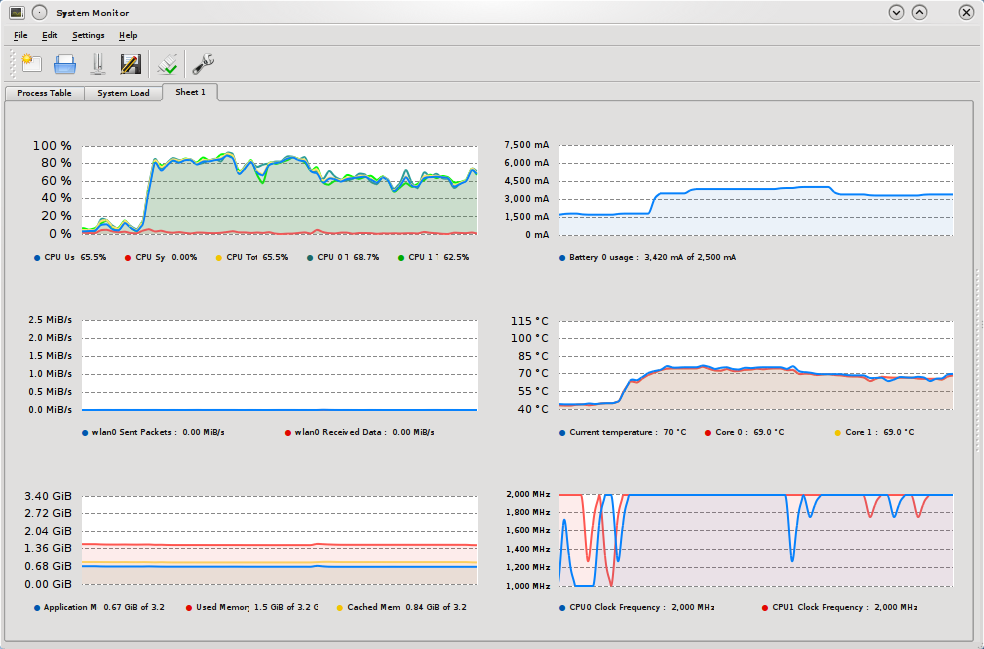
In a more or less idle state my laptop draws around 1500mA of current
(according to ACPI), CPU utilization is around 3% and clock averaged both
cores is somewhere around 1.5Ghz (1Ghz min 2Ghz max .25Ghz step size utilizing
the on-demand CPU frequency governor). Firing up the video through youtube in
windowed mode (which scales the video to around 800pixels) The CPU utilization
jumps up to around 85% and current draw to around 44000mA clock is continually
kept at 2Ghz on both cores. Setting the movie to full screen (1080 pixels
wide) decreases CPU usage to 70% and current draw to 3500mA, this might sound
counter intuitive but it makes perfect sense as at 1920 wide the video is in
native resolution and does not need to be scaled (This actually demonstrates
that Flash does not make good use of the hardware scaling AKA
Xv). Viewing the same 1080p
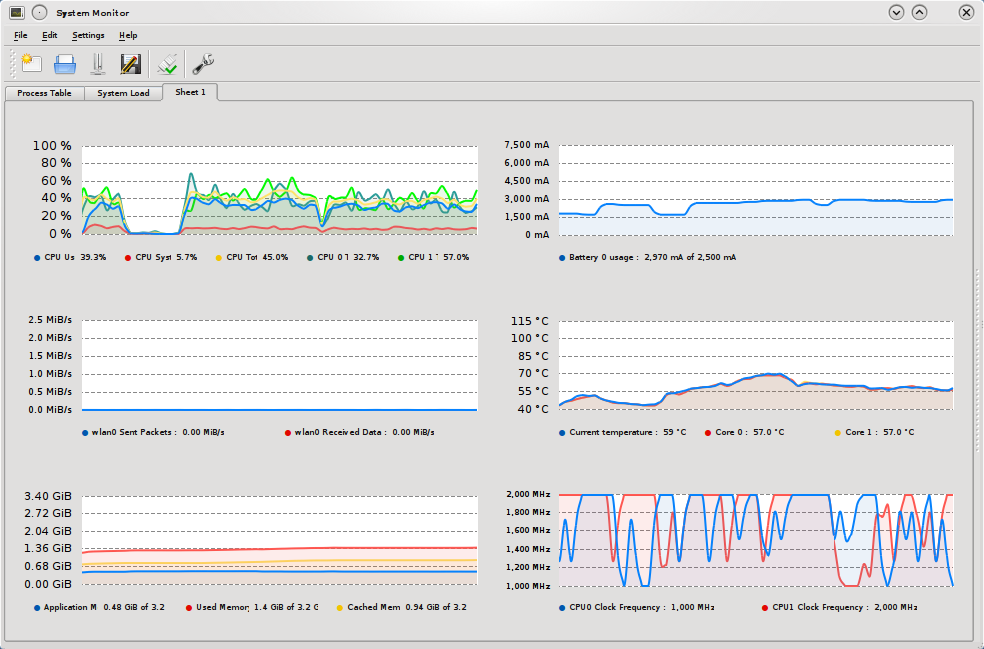
trailer in mplayer, does reduce CPU load and
current draw. Size of the video window does not matter much scaling it to
about 800pixels or viewing in native 1920 pixels wide results in same numbers,
thanks to mplayers Xv support. CPU utilization is around 40% and CPU does
quite frequently clock down to reduce power consumption, current draw is
around 3000mA.
So what does all of this mean. Assuming the voltage at the built in ACPI
ammeter is equal to battery voltage (11.1V) that means the difference in power
consumption between playing a video in flash vs Mplayer h.264 is about
equivalent to medium strength CFL light bulb (1.5A*11.1V=15watts). Now this
experiment is completely unscientific and has many flaws, primarily perhaps
that I use Linux 64 bit flash player (10,0,42,34) the vast majority of flash
users are obviously on windows and its possible that it runs better on windows
platforms but I wouldn't bet money on that.
It makes me wonder if google is supposedly so concerned about being
green maybe they should think about
switching the default video format for youtube. We can do some interesting
estimations. Lets assume that the average user of youtube watches 10 minutes
worth of content in the default flash format, that means they consume about (
10hours * 15watts / 60 minutes in an hour * 52 weeks in a year / 1000 watt
hours in megawatt hours) .13 kilowatt hours per year more than using other
formats. This does not sound like all that much but, assuming that 5% of the
world population fits into this category it equals to about 40 000 000
kilowatts of power that could be saved. What does this number really mean? I
invite you to go to the EPA Greenhouse calculator and plug it in. You'll see its equivalent
to annual emission of 5500 cars. Again the numbers are completely unscientific
but even if they are off by a factor of 3, it is still a significant number.
It would be nice for someone to conduct a more thorough investigation.
While conducting this experiment I noticed something interesting. Playing the
1080p video in youtube would work fine for the first 1.5 min but then it would
get choppy. The full trailer was fully downloaded so it didn't make much
sense. Firing up KDE System monitor I was able to quite quickly to figure out
the problem. As the video got choppy the CPU clock would drop while usage
remained high, clearly the problem must be with cooling. System monitor was
reporting CPU temperature of about 100C and power consumption of almost
6000mA. It had been a while since I cleaned the inside of my laptop, so I
stripped it apart and took out a nice chunk of dust that was between the
radiator and the fan. After this CPU temperature never went above 85C and
current draw was at a much more reasonable 4400 while playing the flash video.
Hopefully this will resolve my choppy hulu problem.
The graphs of this experiment are available. The flash
graph, at first the scale
trailer was played following by full screen. For the mplayer
graph the inverse was done,
first full screen then scaled .. but it doesn't matter much for mplayer.
LILUG
WWTS
software
2010-04-07T22:42:19-04:00
En guarde? La ou est le salut?
In reply to Josef "Jeff" Sipeks
reply to my post entitle SMTP --
time to chuck it from a couple of
years ago.
This is a (long overdue) reply to Ilya's post:
SMPT -- Time to chuck it.
[...]
There are two apparent problems at the root of the SMTP protocol which
allow for easy manipulation: lack of authentication and sender validation, and
lack of user interaction. It would not be difficult to design a more flexible
protocol which would allow for us to enjoy the functionality that we are
familiar with all the while address some, if not all of the problems within
SMTP.
To allow for greater flexibility in the protocol, it would first be broken
from a server-server model into a client-server model.
This is first point I 100% disagree with...
That is, traditionally when one would send mail, it would be sent to a
local SMTP server which would then relay the message onto the next server
until the email reached its destination. This approach allowed for email
caching and delayed-send (when a (receiving) mail server was off-line for
hours (or even days) on end, messages could still trickle through as the
sending server would try to periodically resend the messages.) Todays mail
servers have very high up times and many are redundant so caching email for
delayed delivery is not very important.
"Delayed delivery is not very important"?! What? What happened to the whole
"better late than never" idiom?
It is not just about uptime of the server. There are other variables one
must consider when thinking about the whole system of delivering email. Here's
a short list; I'm sure I'm forgetting something:
- server uptime
- server reliability
- network connection (all the routers between the server and the "source")
uptime
- network connection reliability
It does little to no good if the network connection is flakey. Ilya is
arguing that that's rarely the case, and while I must agree that it isn't as
bad as it used to be back in the 80's, I also know from experience that
networks are very fragile and it doesn't take much to break them.
A couple of times over the past few years, I noticed that my ISP's routing
tables got screwed up. Within two hours of such a screwup, things returned to
normal, but that's 2 hours of "downtime."
Another instance of a network going haywire: one day, at Stony Brook
University, the internet connection stopped
working. Apparently, a compromised machine on the university campus caused a
campus edge device to become overwhelmed. This eventually lead to a complete
failure of the device. It took almost a day until the compromised machine got
disconnected, the failed device reset, and the backlog of all the traffic on
both sides of the router settled down.
Failures happen. Network failures happen frequently. More frequently that I
would like them to, more frequently than the network admins would like them
to. Failures happen near the user, far away from the user. One can hope that
dynamic routing tables keep the internet as a whole functioning, but even
those can fail. Want an example? Sure. Not that long ago, the well know video
repository YouTube disappeared off the face of the
Earth...well, to some degree. As this RIPE NCC RIS case
study shows, on
February 24, 2008, Pakistan Telecom decided to announce BGP routes for
YouTube's IP range. The result was, that if you tried to access any of
YouTube's servers on the 208.65.152.0/22 subnet, your packets were directed to
Pakistan. For about an hour and twenty minutes that was the case. Then YouTube
started announcing more granular subnets, diverting some of the traffic back
to itself. Eleven minutes later, YouTube announced even more granular subnets,
diverting large bulk of the traffic back to itself. Few dozen minutes later,
PCCW Global (Pakistan Telecom's provider responsible for forwarding the
"offending" BGP announcements to the rest of the world) stopped forwarding the
incorrect routing information.
So, networks are fragile, which is why having an email transfer protocol
that allows for retransmission a good idea.
Pas touche! I have not conducted extensive surveys of mail server
configurations, but, from personal experience; most mail server give up on
sending email a lot sooner than recommended. RFC
2821 calls for a 4-5 day period. This is
a reflection of the times, email is expected to deliver messages almost
instantaneously (Just ask Ted Stevens!).
As you are well aware I am not implying that networks are anywhere near
perfect, it just does not matter. If you send a message and it does not get
delivered immediately your mail client would be able to tell you so. This
allows you to reacts, had the message been urgent you can use other forms of
communication to try to get it through (phone ). The client can also
queue the message (assuming no CAPTCHA system, more on that later) and try to
deliver it later. Granted machines which run clients have significantly
shorter uptimes than servers but is it really that big of a deal, especially
now that servers give up on delivery just a few hours after first attempt?
I, for one, am looking forward to the day when I no longer have to ask my
potential recipient whether or not they have received my message.
Instead, having direct communication between the sender-client and the
receiver-server has many advantages: opens up the possibility for CAPTCHA
systems, makes the send-portion of the protocol easier to upgrade, and allows
for new functionality in the protocol.
Wow. So much to disagree with!
- CAPTCHA doesn't work
- What about mailing lists? How does the mailing list server answer the
CAPTCHAs?
- How does eliminating server-to-server communication make the protocol
easier to upgrade?
- New functionality is a nice thing in theory, but what do you want from
your mail transfer protocol? I, personally, want it to transfer my email
between where I send it from and where it is supposed to be delivered to.
- If anything eliminating the server-to-server communication would cause
the MUAs to be "in charge" of the protocols. This means that at first there
would be many competing protocols, until one takes over - not necessarily the
better one (Betamax vs. VHS comes to mind).
- What happens in the case of overzealous firewall admins? What if I
really want to send email to bob@example.com, but the firewall (for whatever
reason) is blocking all traffic to example.com?
- Touche! I have to admit CAPTCHAs are a bit ridiculous in this application.
- See above
- By creating more work for admins. It allows users to more directly complain to the admins that the new protocol feature does not work. Yes I know admins want less work and fewer complaining users, but there are benefits. It really comes down to the fact that with more interactivity it is easier to react to changes, servers do not have brains but the people behind their clients do.
- Hopefully that will still happen.
- Well the worse protocol is already winning SMTP, dMTP (dot Mail Transfer Protocol) is so much better even if it is quite vague. MUAs will not be in charge, if they don not play ball then mail will not be delivered.
- Now you are just getting ahead of yourself. Stop making up problems. The solution to overzealous admins, is their removal.
[...]
And so this brings us to the next point, authentication, how do you know
that the email actually did, originate from the sender. This is one of the
largest problems with SMTP as it is so easy to fake ones outgoing email
address. The white list has to rely on a verifiable and consistent flag in the
email. A sample implementation of such a control could work similar to the
current hack to the email system, SPF, in which a special entry is made in the
DNS entry which says where the mail can originate from. While this approach is
quite effective in a sever-server architecture it would not work in a client-
server architecture. Part of the protocol could require the sending client to
send a cryptographic-hash of the email to his own receiving mail server, so
that the receiving party's mail server could verify the authenticity of the
source of the email. In essence this creates a 3 way handshake between the
senders client, the senders (receiving) mail server and the receiver's mail
server.
I tend to stay away from making custom authentication protocols.
In this scheme, what guarantees you that the client and his "home server"
aren't both trying to convince the receiving server that the email is really
from whom they say it is? In kerberos, you have a key for each system, and a
password for each user. The kerberos server knows it all, and this central
authority is why things work. With SSL certificates, you rely on the strength
of the crypto used, as well as blind faith in the certificate authority.
They might, the point is not so much to authenticate the user but to link him
to a server. If the server he is linked to is dirty, well you can blacklist
it. Much of the spam today is sent from bot-nets, in this schema all the
individual botnet senders would have to link themselves to a server.
Obviously, a clever spammer would run a server on each of the zombie machines
to auth for itself. The catch is that he would have to ensure that the
Firewalls/NATs are open and that there is a (sub-) domain pointing back at the
server. This is all costly for the spammer and for the good guy it'll be easy
to trace down the dirty domains.
At first it might seem that this process uses up more bandwidth and
increases the delay of sending mail but one has to remember that in usual
configuration of sending email using IMAP or POP for mail storage one
undergoes a similar process,
Umm...while possible, I believe that very very large majority of email is
sent via SMTP (and I'm not even counting all the spam).
Carton jaune, I addressed that issue in my original posting which is just 2
sentences below this one. Excessive lobotomy is not appreciated.
first email is sent for storage (over IMAP or POP) to the senders mail
server and then it is sent over SMTP to the senders email for redirection to
the receivers mail server. It is even feasible to implement hooks in the IMAP
and POP stacks to talk to the mail sending daemon directly eliminating an
additional socket connection by the client.
Why would you want to stick with IMAP and POP? They do share certain ideas
with SMTP.
Carton rouge, I said nothing about sticking to IMAP/POP. The point is that the
system can be streamlined somewhat.
For legitimate mass mail this process would not encumber the sending
procedure as for this case the sending server would be located on the same
machine as the senders receiving mail server (which would store the hash for
authentication), and they could even be streamlined into one monolithic
process.
Not necessarily. There are entire businesses that specialize in mailing list
maintenance. You pay them, and they give you an account with software that
maintains your mailing list. Actually, it's amusing how similar it is to what
spammers do. The major difference is that in the legitimate case, the customer
supplies their own list of email address to mail. Anyway, my point is, in
these cases (and they are more common than you think) the mailing sender is on
a different computer than the "from" domain's MX record.
I do not think that increasing the burden on mass mailers even good ones is
such a bad thing.
[...]
I really can't help but read that as "If we use this magical protocol that
will make things better, things will get better!" Sorry, but unless I see some
protocol which would be a good candidate, I will remain sceptical.
And I can not help but read this as "We should not think about improving
protocols because it impossible to do better." In any case I appreciate your
mal-pare. The discussion is important as letting protocols rot is not a good
idea.
[...]
LILUG
WWTS
news
software
2009-04-22T10:47:24-04:00
Eric S. Raymond speaks heresy.
Recently my local LUG (LILUG) invited Eric S.
Raymond (ESR) to come and speak. For those of you
who are not familiar with ESR, he is one of the three largest icons of the
Open Source/Free Software movement. Needless to say, it was an honor so see
him speak. For the most part, his talk was quite tame but one of the points he
raised seemed quite controversial. According to him the GPL and other viral
licenses are no longer needed as they do more harm than good to the community.
I don't want to put words into his mouth so I've transcribed what he said
during the talk. You can view the ESR Q/A
talk in its entirety, this
specific excerpt is about 45 minutes into the video.
What is the point of being famous and respected if you can't speak heresy
about your own movement. What is the point?
One of my heretical opinions is that we worry way too much about licensing.
And in particular; I don't think we really need reciprocal licensing. I don't
think we need licenses like the GPL, that punish people for taking code
closed-source. Let me explain what I think. And then I'll explain [why] the
fact we don't actually need those [licenses] matters.
I don't think we need them because. There has been a fair amount of economic
analysis done in the last 10 years, significant amount of it has been done by,
well, me. Which seems to demonstrate that open source is what the economist
call a more efficient mode of production use, superior mode of production. You
get better investment, better return out of the resources you invested by
doing open source development than closed source development. In particular,
there have been a number of occasions on which people have taken open source
products that were reasonable successful, and just taken them closed.
Effectively putting them under proprietary control, proprietary licensing and
then tried to make a business model out of that. They generally fail. And the
reason they fail is pretty simple. That is because when you take a product
closed, you are now limited to what ever small number of developers that your
corporation can afford to hire. The open source community that you just turned
your back on does not, they have more people than you. They can put out
releases more frequently, getting more user feedback. So the suggestion is,
simply because of the numerical dynamics of the process: taking open software
closed is something that the market is going to punish. You are going to lose.
The inefficiencies inherent in closed source development are eventually going
to ambush you, going to [inaudible] you, and your are not going to have a
business model or product anymore. We've seen this happened number of times.
But now, lets look at the implications of taking this seriously. The
question I found myself asking is: if the market punished people for taking
open source closed, then why do our licenses need to punish people for taking
open source closed? That is why I don't think you really need GPL or a
reciprocal licenses anymore. It is attempting to prevent the behavior that the
market punishes anyway. That attempt has a downside, the downside is that
people, especially lawyers, especially corporate bosses look at the GPL and
experience fear. Fear that all of their corporate secrets, business knowledge,
and special sauce will suddenly be everted to the outside world by some
inadvertent slip by some internal code. I think that fear is now costing us
more than the threat of [inaudible]. And that is why I don't we need the GPL
anymore.
-- Eric S. Raymond
Eric then went on to say that the BSD license is a good alternative to the
GPL. This has sparked a heated discussion on the Free Software Round
Table
(FSRT) radio shows mailing list. While
one can admire of the simplicity and clarity of the license it seems far
fetched to say that it should be replacing the GPL. While yes there are
economical incentive for corporations to keep code Open Source but the
relative cost of closing the source depends largely on the size of company.
Yes some small companies will not be able to afford to keep a code base alive
with internal/contracted developers for larger companies the costs are a lot
easier to digest.
Prime example of such a large company is Apple. In 2001
Apple came out with a completely new version of its operating system, MAC OS
X. Although a successor to MAC OS 9, it was very different. OS X borrowed a
very large code base from the BSDs, and some (pretty much everything but
Darwin) of the code was effectively closed. This has not prevented Apple or OS
X from thriving.
From the other end of the spectrum, are the companies such as MySQL AB which
produce Free Software but also sell closed source licenses of the same code
for a 'living.' There is a market for this, it exists because of those scared
lawyers and corporate bosses. Killing the GPL would effectively kill this
market, as a result development on some of these projects would slow down
significantly.
The Open Source/Free Software movement is thriving, it does not mean its a
good time to kill the GPL. In fact I don't think there will ever be a time
when killing the GPL will do more good than harm.
lilug
news
software
2009-03-23T11:30:14-04:00
Page 1 / 4
»